Modo Client Mute
Configuración optimizada para dispositivos móviles sin gran línea de vista
IMPORTANTE:
🚫 NO USAR LICENCIA DE RADIOAFICIONADO EN NINGUNA CIRCUNSTANCIA
🚫 NO USAR RANGE TEST MODE
🚫 NO ACTIVAR LA OPCIÓN IGNORAR DUTY CYCLE
🚫 NO USAR LICENCIA DE RADIOAFICIONADO EN NINGUNA CIRCUNSTANCIA
🚫 NO USAR RANGE TEST MODE
🚫 NO ACTIVAR LA OPCIÓN IGNORAR DUTY CYCLE
Modo Client Mute
Actualizado el 30/11/2025
Dirigido a: Radios móviles sin gran línea de vista
Formato LongName: ONomeDoRadio-8 (usar -4 o -24 para 433MHz o 2.4GHz)
Configuración RF
- Región: EU_868 / EU_433 / 2.4GHz
(según la frecuencia de la radio) - Frequency Slot: EU_868 → Slot 1 / EU_433 → Slot 4 / 2.4GHz → Slot 6
- Preset: LongFast
- OK to MQTT: ON
- Ignore MQTT: OFF
- Max Hops: 5
Si el firmware < (por debajo de) 2.7.13 Alpha, se debe poner 4 Hops.
Configuración del dispositivo
- Modo: Client Mute
- Node Info Broadcast Interval: 43200s (Android) / 12h (iOS)
- Rebroadcast Mode: CORE_PORTNUMS_ONLY
Posición (GPS)
- Position broadcast Interval: 3600s (Android) / 1h (iOS)
- Smart Position: ON
(solo si la radio tiene GPS) - GPS Mode: ENABLED
(solo si la radio tiene GPS) - Smart Broadcast Minimum Distance: 350m
- Smart Broadcast Minimum Interval: 650s
- Minimum Distance: 120m
- GPS Update Interval: 600s (Android) / 10min (iOS)
Telemetría (Opcional)
- Device Metrics Update Interval: 21600
Canal principal
- Canal: LongFast
(no cambiar manualmente el nombre; dejarlo en blanco mantiene el nombre automático del preset) - Clave:
AQ== - Uplink & Downlink: ON
Configuración MQTT
- Dirección: mqtt.meshtastic.pt
- Usuario: meshdev
- Password: large4cats
- Encryption: ON
- TLS: OFF
- Tópico: msh
- Proxy to Client: ON / OFF
ON → Nodo conectado directamente por MQTT vía Bluetooth
OFF → Solo por RF - Map Reporting Interval: 3600s (Android) / 1h (iOS)
Canales secundarios
🆘 SOS
Canal dedicado a comunicaciones de emergencia.
⚠️ El nombre del canal distingue mayúsculas y minúsculas.
Nombre del canal: SOS
Tipo: Secundario
Clave: (vacío)
Uplink & Downlink: ON
🌍 Iberia
Canal que sirve de puente entre la comunidad portuguesa y española.
⚠️ El nombre del canal distingue mayúsculas y minúsculas.
Nombre del canal: Iberia
Tipo: Secundario
Clave: (vacío)
Uplink & Downlink: ON
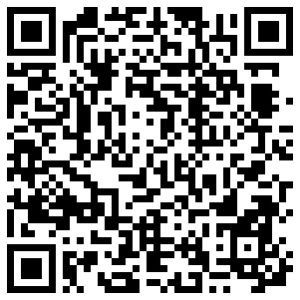
QR-CODE Quick Config
Después de escanear, verifica en la configuración de canales que UPLINK y DOWNLINK estén ACTIVOS.