Fixed Client Mode (Gateway)
Optimized setup for fixed radios with Wi-Fi (sustained area coverage)
IMPORTANT:
🚫 DO NOT USE AMATEUR RADIO LICENSE UNDER ANY CIRCUMSTANCES
🚫 DO NOT USE RANGE TEST MODE
🚫 DO NOT ENABLE THE IGNORE DUTY CYCLE OPTION
🚫 DO NOT USE AMATEUR RADIO LICENSE UNDER ANY CIRCUMSTANCES
🚫 DO NOT USE RANGE TEST MODE
🚫 DO NOT ENABLE THE IGNORE DUTY CYCLE OPTION
Fixed Client Mode (Gateway)
Updated on 04/06/2025
Intended for: Fixed radios (in enclosures, rooftops/buildings) with Wi-Fi, to cover the local area steadily.
LongName format: ONomeDoRadio-GW-8
Use -4 for 433 MHz or -24 for 2.4 GHz
RF Settings
- Region: EU_868 / EU_433 / 2.4GHz
(depending on the radio frequency) - Frequency Slot: EU_868 → Slot 1 / EU_433 → Slot 4 / 2.4GHz → Slot 6
- Preset: LongFast
- OK to MQTT: ON
- Ignore MQTT: OFF
- Max Hops: 4
Device Settings
- Mode: CLIENT_BASE
If firmware < (below) 2.7.13 Alpha, set Client.Note: To avoid consuming unnecessary Hops (Zero Hop), all -R, -RL, -GW, -GT and personal clients should be set as Favorites. - Node Info Broadcast Interval: 43200s (Android) / 12h (iOS)
- Rebroadcast Mode: CORE_PORTNUMS_ONLY
Telemetry (Optional)
- Device Metrics Update Interval: 43200
Wi-Fi
- SSID / PSK: Enter Wi-Fi network credentials
IP may vary by router. Management access via Android app or web interface.
Position (GPS)
- Position Broadcast Interval: 43200s (Android) / 12h (iOS)
- Use Fixed Position: ENABLED
(enter GPS coordinates of the fixed point) - GPS Mode: DISABLED
- GPS Update Interval: 14400s (Android) / 4h (iOS)
Primary Channel
- Channel: LongFast
(do not manually change the name; leaving it blank keeps the preset’s automatic name) - Key:
AQ== - Uplink & Downlink: ON
MQTT Settings
- Address: mqtt.meshtastic.pt
- Username: meshdev
- Password: large4cats
- Encryption: ON
- TLS: OFF
- Topic: msh
- OK to MQTT: ON
- Ignore MQTT: OFF
- Proxy to Client: N/A
Not applicable in this mode (fixed gateway operating via Wi-Fi/MQTT and RF). - Map Reporting Interval: 14400s (Android) / 4h (iOS)
(applies to client / client_mute modes)
Secondary Channels
🆘 SOS
Channel dedicated to emergency communications.
⚠️ The channel name is case-sensitive.
Channel Name: SOS
Type: Secondary
Key: (empty)
Uplink & Downlink: ON
🌍 Iberia
Channel that acts as a bridge between the Portuguese and Spanish communities.
⚠️ The channel name is case-sensitive.
Channel Name: Iberia
Type: Secondary
Key: (empty)
Uplink & Downlink: ON
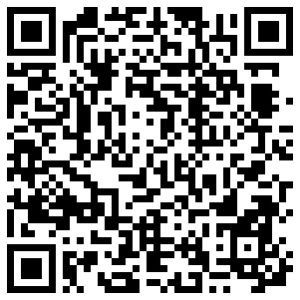
QR-CODE Quick Config
After scanning, check in channel settings that UPLINK and DOWNLINK are ENABLED.